sequencerFlow
Premiere/Resolve-style editing tools for Blender's Video Sequence Editor.
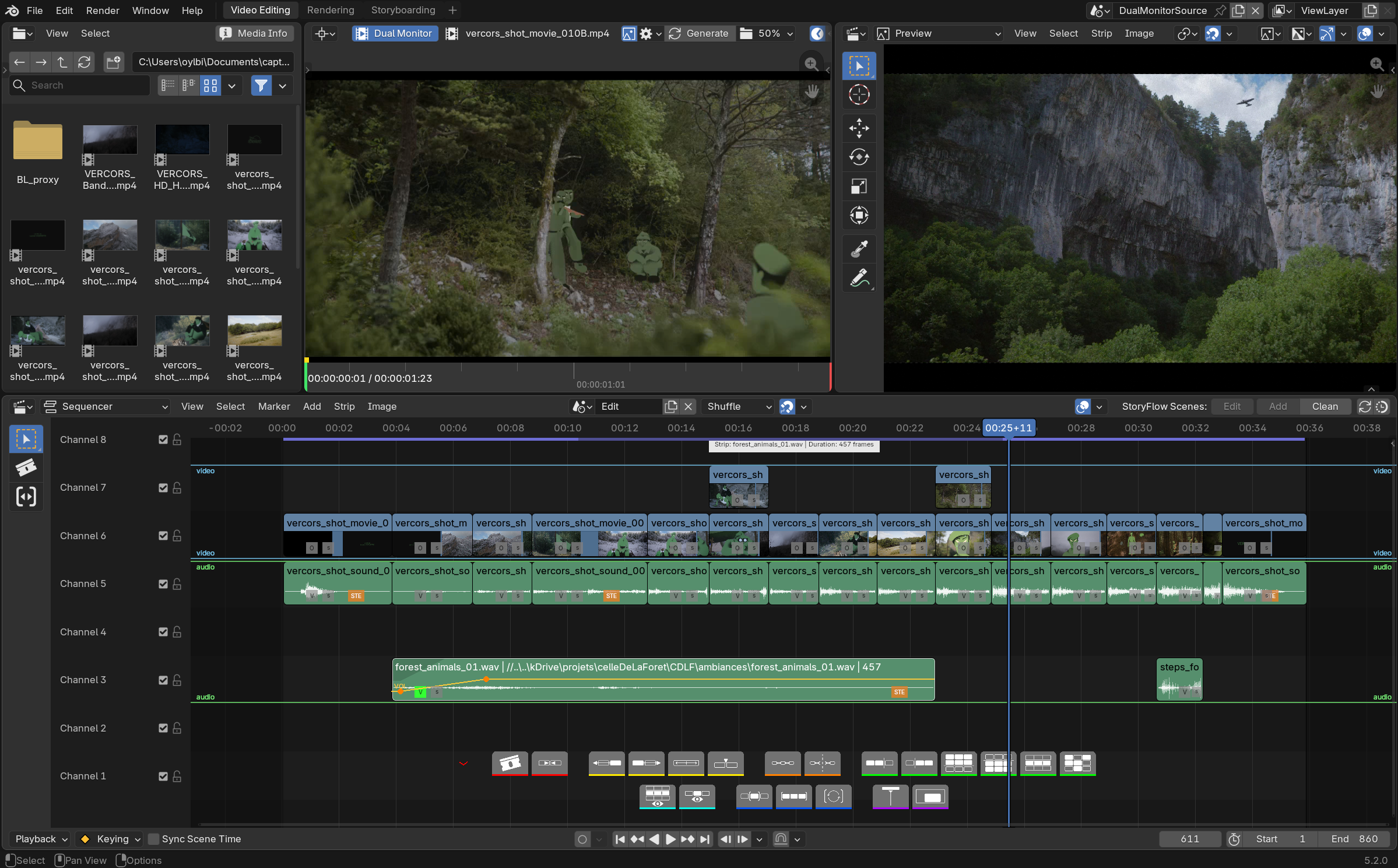
sequencerFlow adds a floating, GPU-drawn toolbar and a set of production tools directly into the VSE, closing the gap between Blender's native sequencer and a dedicated NLE.
LITE and PRO
sequencerFlow ships as two tiers from the same codebase:
- LITE (free): the contextual toolbar (except Insert), strip connections, advanced selections, channel/strip isolation, frame range, batch rename, per-strip export, zone guides, configurable shortcuts.
- PRO (paid): everything in LITE, plus the Source Viewer (3-point editing and Insert), volume/opacity curves drawn on strips, speed control (retiming badge and freeze frame), advanced audio tools (VU meter, channel reassignment), and the timeline minimap.
See Features for the detailed breakdown.
Presentation video
At a glance
- A contextual toolbar drawn right into the VSE: smart split, join, swap, slip, directional/channel selection, selection sets, channel and selection isolation, auto-fit frame range, follow-playhead during playback.
- Source Viewer (PRO) — real 3-point editing: set IN/OUT points on any source clip in a dedicated space (second monitor or scene), then insert at the playhead with every later strip rippling out of the way automatically.
- Zone guides — colored bands across channel ranges so a busy timeline stays organized and readable at a glance.
- Volume and opacity curves (PRO) drawn directly on strips, click-and-drag editable — driving real Blender F-Curves.
- Speed control (PRO): a badge on every strip for quick retiming, percentage-based speed dialog, freeze frame, all built on Blender's own native retiming operators.
- Strip connections — automatic or manual linking between related strips (typically a video clip and its audio). Reads these links to keep video/audio pairs together when exporting to Resolve via sequencerOTIO (a separate SlateFlow add-on).
- Batch rename and per-strip export.
Why it feels native
sequencerFlow never replaces a Blender panel, tool or shortcut — it only adds a layer on top. The toolbar and every overlay (curves, zone guides, connection markers) are drawn straight into the viewport, and every action they trigger is a real Blender operator or a real F-Curve edit. Disable it, and your strips, keyframes and scenes are exactly as Blender left them.
Requires Blender 5.2 or newer.
License
GNU General Public License v3.0 or later
— SPDX: GPL-3.0-or-later.
sequencerFlow is part of the SlateFlow suite.
Support
slateFlow is developed in my spare time, alongside my freelance work. Prices are deliberately affordable: in return, I can't commit to fix deadlines or on-demand development. Feedback and ideas are welcome — the most important bugs will be fixed, and good ideas will make their way in. Thank you for your understanding.
Found a bug? See Reporting a bug for what to include.